
LEGIBILITY VS READABILITY
A typeface can be perfectly legible and completely unreadable. These are two different things — and confusing them is one of the biggest mistakes in design.
CORE CONCEPT
IMPORTANCE OF LEGIBILITY VS READABILITY
KEY KNOWLEDGE
1
Legibility = can you distinguish each individual letter clearly? It’s a property of the typeface design itself
REAL WORLD EXAMPLE
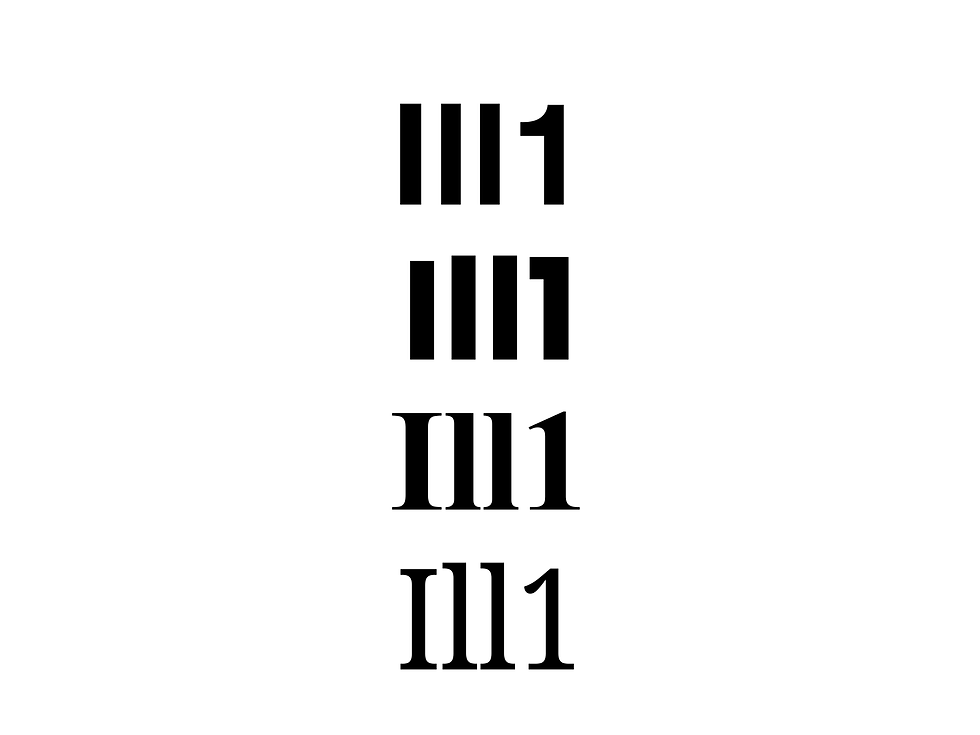
Open a notes app and type "Ill1" — that's a capital I, a lowercase l, another lowercase l, and the number 1. Now change the typeface. In some typefaces, all four characters look almost identical — four vertical lines, indistinguishable. In others, each one looks clearly different: the capital I has serifs, the lowercase l has a curve at the bottom, and the 1 has a flag at the top. That difference is legibility — how easily you can tell individual characters apart. A legible typeface makes every letter unique and unmistakable. An illegible one makes you guess. This matters most in critical contexts: a medicine label, a licence plate, an emergency sign. If someone misreads a "1" as an "l" on a prescription, the consequences are real. Legibility isn't about beauty — it's about clarity.
Image: The characters "I l 1" (capital I, lowercase L, number one) shown in a typeface where they're nearly identical — the three characters looking like the same vertical line, demonstrating the legibility problem that well-designed typefaces solve.
2
Readability = can you comfortably read extended text? It's a property of the overall typographic setup
REAL WORLD EXAMPLE
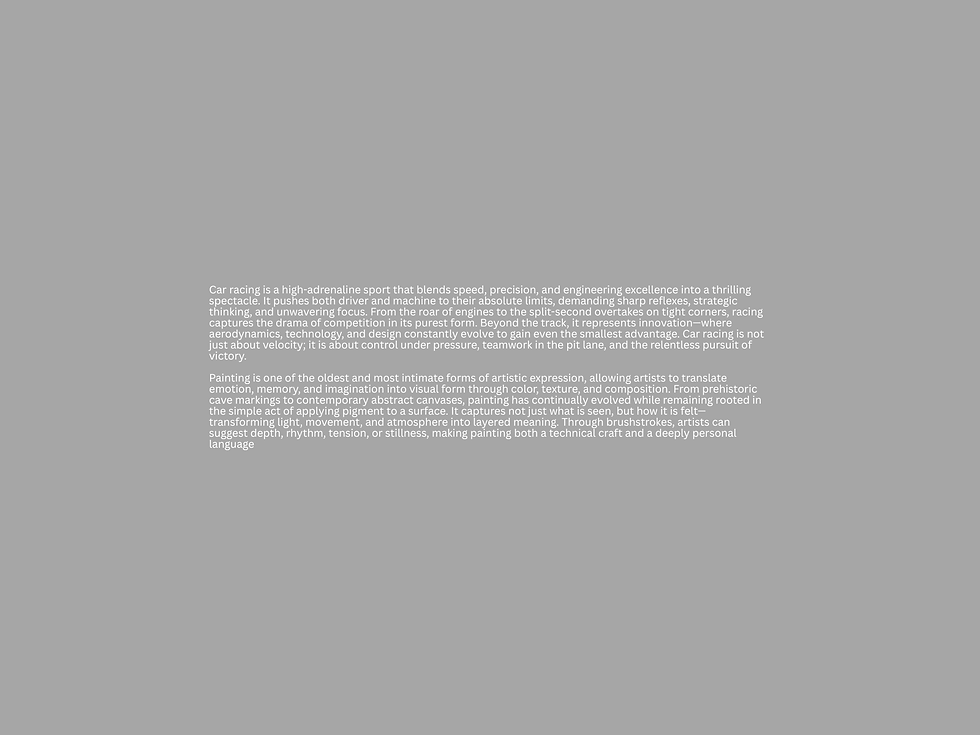
Take a perfectly legible typeface — say, Garamond, where every letter is beautifully distinct. Now set it at 8pt on a phone screen, with tight line-spacing, on a pale grey background, in lines that stretch edge-to-edge. Every individual letter is still clear. But reading an entire paragraph is miserable — the text is too small, the lines are too close, there's not enough contrast, and the lines are too long for your eye to track back to the start. The typeface is legible. But the typographic setup makes it unreadable. Readability is the total experience: typeface choice plus size plus spacing plus line length plus contrast plus background. A legible typeface is necessary for readability — but it's not sufficient. Everything around it has to be right too.
3
A typeface can be legible (clear letters) but unreadable (poor spacing, wrong size, bad background)

REAL WORLD EXAMPLE
You've seen it on wedding invitations: an elaborate script typeface — every letter beautifully formed, individually recognisable. But the designer set the venue address in that same script at tiny size over a busy floral photograph with barely any contrast. Each letter is technically legible on its own. But reading the actual address — the thing guests need to find the venue — is nearly impossible. The mother of all typographic sins: making the critical information beautiful but unreadable. Fashion magazines do this deliberately — they'll overlay thin white text on a complex photograph because the aesthetic matters more than the reading ease. But for functional text — addresses, phone numbers, directions — legibility without readability is a design failure.
4
Factors affecting legibility: distinctiveness of letterforms, x-height, counter size, stroke contrast, serif presence
REAL WORLD EXAMPLE
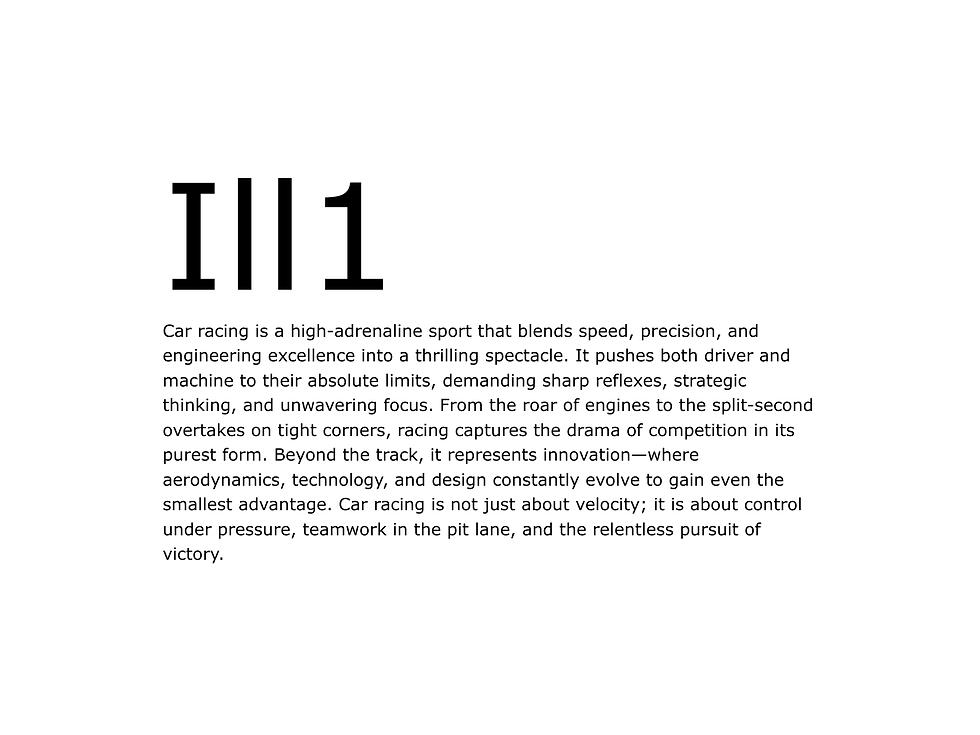
Why is Verdana one of the most legible typefaces ever made? Because its designer, Matthew Carter, engineered every feature for letter distinction: large x-height so lowercase letters are bigger and clearer; wide, open counters so "a" and "e" don't close up at small sizes; distinct letterforms so capital "I," lowercase "l," and number "1" all look different; and generous stroke widths so letters don't disappear on low-resolution screens. Compare that to a decorative typeface where the "a" and "o" look similar, the "r" and "n" blur together, and the counters close up at small sizes. Both are typefaces. But one was designed for legibility from the ground up, and the other was designed for style. Knowing which features create legibility helps you choose the right typeface for the right job.
5
Factors affecting readability: typeface choice, font size, leading (line-spacing), tracking, line length, alignment, colour contrast with background
REAL WORLD EXAMPLE
Here's a checklist that every professional designer runs before approving body text: Is the typeface legible? Is the size at least 16px on mobile? Is the line-spacing at least 1.5 times the font size? Is the tracking neither too tight nor too loose? Are the lines between 45 and 75 characters long? Is the text left-aligned? Is there strong contrast between the text colour and the background? If any one of these fails, readability drops. It's like a chain — every link must hold. A great typeface at the wrong size fails. Perfect size with cramped leading fails. Good leading with lines too long fails. Readability isn't one thing — it's seven things all working together. And the best designers check every single one.

6
Ideal line length for readability: roughly 45–75 characters per line. Too short = choppy. Too long = the eye loses its place
REAL WORLD EXAMPLE
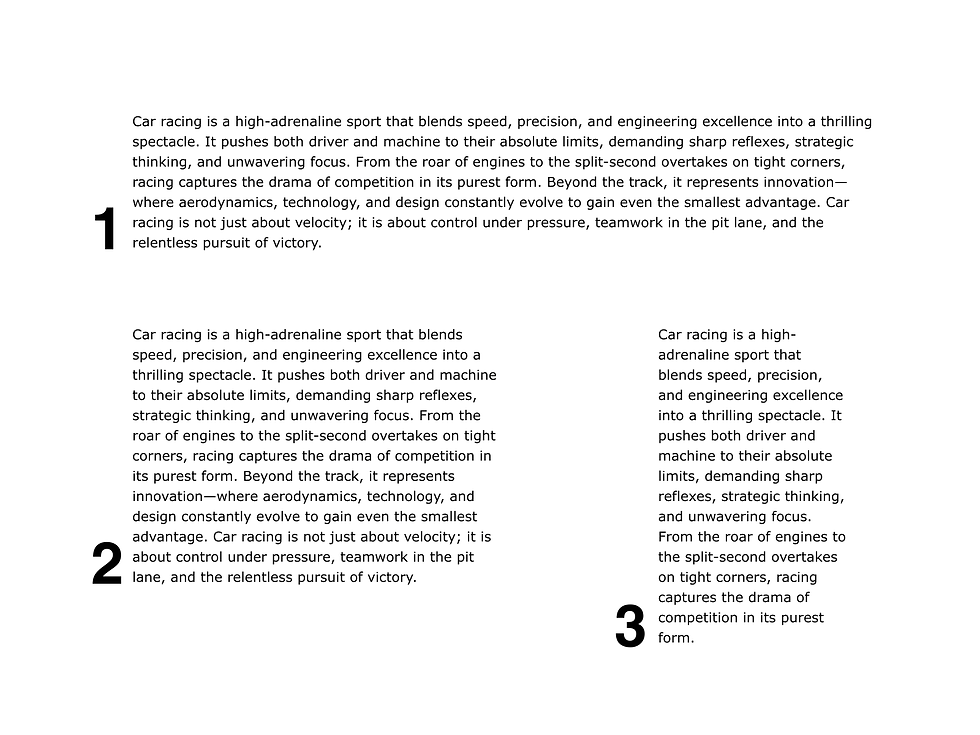
Next time you read something comfortable on your phone, count the characters in one line. You'll land somewhere around 45–65 characters. That's the sweet spot. Now open a website on a desktop where the text stretches all the way across the screen — maybe 120 characters per line. By the time your eye reaches the end of a line and needs to jump back to the start of the next one, it's lost. Which line was I on? You re-read. That's the eye tracking failure that happens when lines are too long. Now imagine lines with only 15 characters — reading feels jumpy, choppy, like a telegram. The 45–75 character range is where human eyes can comfortably finish a line and return to the start of the next one without losing position. It's not a design opinion — it's how human vision works.
7
Screen readability requires larger sizes and more generous spacing than print readability

REAL WORLD EXAMPLE
Pick up a printed novel. The body text is probably 10pt or 11pt — comfortably readable on paper because printed letters are sharp, the page doesn't glow, and you hold the book at a fixed distance. Now open an ebook of the same novel on your phone. If it's set at the same 10pt, it's unbearably small. Why? Because a phone screen glows (which fatigues eyes faster), the resolution varies, your holding distance shifts, and there's ambient light competing. Screen text needs to be larger — typically 16–18px minimum for body text. It also needs more line-spacing, because on a glowing screen, lines that feel fine on paper feel cramped. Print and screen are different mediums with different rules. A designer who uses print spacing on screen will create text that's technically fine but physically uncomfortable to read.
8
The best typography balances both: clear, distinct letterforms set at comfortable sizes with generous spacing

REAL WORLD EXAMPLE
Open the Kindle app on your phone and read a few pages. Notice how effortless it feels — you read for ten minutes without once thinking about the text. That's because the Kindle team balanced everything: a legible typeface with clear letterforms (Bookerly, designed specifically for screen reading), a comfortable size (adjustable, but defaulting to readable), generous line-spacing, manageable line length on the narrow screen, and strong contrast (dark text on a clean background). Legibility and readability, both optimised. Neither sacrificed for the other. That balance is the goal of every professional typographic decision — letterforms that are individually clear, presented in conditions that make extended reading feel like breathing: effortless and automatic. When both come together, the text disappears and only the meaning remains.
Pro Connection
UX designers test readability with real users on real devices. Graphic designers check legibility at multiple sizes before finalising a typeface selection. Brand guidelines specify minimum sizes for body text to ensure readability across all applications. When a client says “I can’t read this,” the designer knows to check: is it a legibility problem (wrong typeface) or a readability problem (wrong size, spacing, or contrast)?
PROFESSIONAL TERMINOLOGY
CLICK TO REVEAL and CLICK TO COVER
How easily individual characters can be distinguished from each other — a property of the typeface design
What is
LEGIBILITY
How comfortably extended text can be read — affected by size, spacing, line length, and background
What is
READABILITY
The width of a text column, measured in characters per line — ideal is roughly 45–75 characters
What is
LINE LENGTH
The visual difference between text and its background — critical for readability
What is
CONTRAST (TYPOGRAPHIC)
Designing so that content is usable by everyone, including people with visual or cognitive impairments
What is
ACCESSIBILITY
THE HIERARCHY MAP
Right now, a screen is shouting at you, talking to you, and whispering at you — all at once. Can you tell who's who?
what TO DO
Open any app or website on your phone.
Find exactly 3 levels of text hierarchy: Level 1 — the HEADING (biggest and boldest), Level 2 — the BODY (the main content), Level 3 — the CAPTION (the smallest detail).
Take a screenshot.
Repeat with a second, different app.
Ask yourself: which app has clearer hierarchy? Which one makes it easiest to know where to look first?
CHALLENGE
DISCOVERY
You can use these SOFTWARES for this Discovery Challenge
FREE SOFTWARE : Phone Screenshot, Chrome Browser, Google Keep, Canva
PAID SOFTWARE : Procreate Pocket, GoodNotes 6