
LAYOUT — WHERE THINGS GO
What if rearranging furniture in a room could change how you feel? What if moving an image on a page could change what you think? That’s the power of layout.
CORE CONCEPT
IMPORTANCE OF LAYOUT — WHERE THINGS GO
KEY KNOWLEDGE
1
Layout = the arrangement of elements within a defined space — applies to pages, screens, rooms, and outdoor environments

REAL WORLD EXAMPLE
Think about your classroom. The teacher’s desk is at the front, the blackboard behind it, student desks face forward, the door is to the side. That’s a layout — every piece of furniture has a position that creates a system. Now imagine if the teacher’s desk was in the back corner, the blackboard was on the ceiling, and desks faced random directions. Same room, same furniture — but the layout makes it useless. Layout is the difference between a space that works and a space that confuses.
2
Every layout is a set of decisions: where does each element go? How much space is between them? What’s the reading or movement order?

REAL WORLD EXAMPLE
Open any page of your textbook. The title is at the top. The main text is in the middle. Page numbers are at the bottom. Images sit next to the paragraphs they relate to. None of this is random — someone decided that your eye should go: title first, then text, then image, then page number. If the page number was at the top in giant font and the title was tiny at the bottom, you’d feel confused. Every layout is hundreds of small decisions about what goes where and why.
3
Grids are invisible structures that help organise layouts — they create alignment, consistency, and visual rhythm

REAL WORLD EXAMPLE
Open Instagram and look at anyone’s profile page. Every photo sits in a perfect 3-column grid. Each photo is the same size, same spacing. That grid is why the page feels organised even if the photos are of completely random things — cats, food, sunsets, selfies. Without the grid, the same photos would look like a mess. The grid is invisible, but it’s doing all the heavy lifting. It’s the skeleton that holds the design together.
4
Good layout creates flow — the eye or body moves naturally through the space without confusion
REAL WORLD EXAMPLE
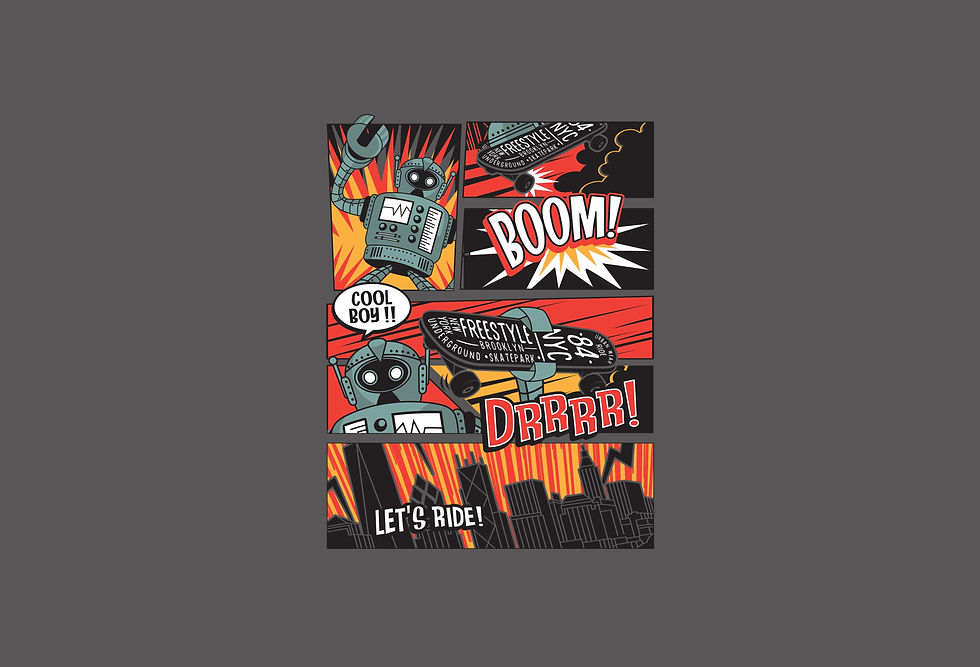
Think about reading a comic book or manga. Your eye jumps from panel to panel in a specific order without anyone explaining the route. Top-left to top-right, then down to the next row. The artist created that flow through the layout — the size of panels, the gaps between them, the placement of speech bubbles. A good comic panel layout makes reading feel effortless. A bad one makes you lost — you don’t know which panel comes next.
5
Bad layout creates friction — the eye gets lost, the body bumps into things, the experience feels awkward
REAL WORLD EXAMPLE
Have you ever used a really bad app or website where you couldn’t find the button you needed? The menu was somewhere weird, the search bar was hidden, and you kept tapping the wrong things? That’s bad layout. It’s not that the features weren’t there — they were just in the wrong places. It’s like a kitchen where the fridge is in the bedroom and the stove is in the bathroom. Everything exists, but nothing is where it should be.

6
Room layouts follow similar principles: furniture placement creates pathways, focal points, and zones of activity
REAL WORLD EXAMPLE
In your living room at home, the sofa probably faces the TV. That’s not just convenience — it creates a “watching zone.” If there’s a dining table in a corner with chairs around it, that’s an “eating zone.” The path between the door and the sofa? That’s a pathway. Someone (maybe your parents, maybe an interior designer) made these layout decisions. Move the sofa to face the wall instead of the TV, and the whole room feels wrong. Same furniture, different layout, completely different experience.

7
Layout connects to visual hierarchy: the layout determines what you encounter first, second, and third

REAL WORLD EXAMPLE
Open YouTube on your phone. What do you see first? The search bar at the top. Then the recommended video thumbnails below. Then the navigation bar at the bottom. YouTube’s layout is designed so your eye follows a specific order: search (find something), browse (see recommendations), navigate (switch sections). If they put the navigation bar at the top and the search bar at the bottom, you’d use the app completely differently. Layout controls the order of your experience.
8
IKEA showrooms use room layouts that guide you on a specific walking path through the entire store — the layout IS the experience

REAL WORLD EXAMPLE
If you’ve ever been to an IKEA store (or seen videos of one), you know the experience: you enter and there’s basically ONE path that winds through the entire store. You walk through living rooms, then kitchens, then bedrooms, then bathrooms. You can’t skip ahead easily. That’s not an accident — it’s a layout designed to make you see everything. The path IS the product. IKEA’s layout is so famous that people study it in design schools.
Pro Connection
Graphic designers start every project by setting up a grid before placing any content. UI designers use 8px or 4px grid systems for pixel-perfect alignment. Interior designers draw floor plans showing furniture placement, pathways, and zones. When someone says “the layout isn’t working,” they mean the arrangement doesn’t create good flow or the elements feel randomly placed.
PROFESSIONAL TERMINOLOGY
CLICK TO REVEAL and CLICK TO COVER
The arrangement of elements within a space — where everything goes and how it relates to everything else
What is
LAYOUT
An invisible structure of lines used to align and organise elements in a layout — the skeleton behind the design
What is
GRID
The space between the content and the edge of the page, screen, or frame — the border of breathing room
What is
MARGIN
The space between columns in a grid layout — prevents content from running together
What is
GUTTER
How smoothly the eye or body moves through a layout — good flow feels natural and effortless
What is
FLOW
An area within a layout dedicated to a specific purpose — a reading zone, a seating zone, a navigation zone
What is
ZONE
THE SPACE FLIP
What if the most important difference between a beautiful design and a stressful one isn't colour, or fonts, or images — it's simply how much space is left around everything?
what TO DO
On your phone, find one app or website that feels spacious and calm — plenty of room around everything.
Find a second app or website that feels crowded and busy — elements packed tightly together.
Screenshot both.
Now look only at the SPACE: how much room is around the text? Between images? At the edges of the screen?
Write one sentence about each, using the words from the capsule: "This feels [calm/busy] because the space is [generous/tight]."
what TO SUBMIT
2 Screenshots | The spacious app and the crowded app — clearly labelled. |
Text | One sentence per screenshot: "This feels [calm/busy] because the space is [generous/tight] — specifically around [the text/images/icons/edges]." Then one more sentence: "The main design difference between them is [observation]." |
CHALLENGE
DISCOVERY
You can use these SOFTWARES for this Discovery Challenge
FREE SOFTWARE : Phone Camera, Canva, Google Keep, PicCollage
PAID SOFTWARE : Canva Pro, VSCO Membership